 The first thing I ask from my media relations team when I join a company is a list of our top 15 reporters and their publications. My first goal is to build relationships with those important influencers so we can facilitate better communication with them. Basic media relations, right? Well, getting that data is another story. Other than educated guesses, getting those names takes a lot of combing through coverage reports and resorting of spreadsheets. ITDatabase solves this problem in seconds.
In just a few weeks, this tool has helped me land two news stories and saved me dozens of hours of research. With a couple clicks, the search tool will deliver a list of the authors that have written on any topic in information technology.
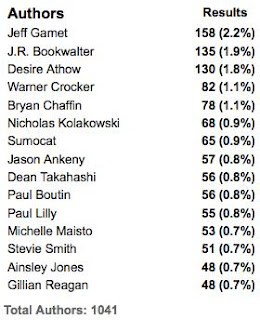 For example, when you search for Apple iPad, it quickly delivers a list of authors and sources that recently wrote about that topic sorted by the story count. Anyone can search in Google News for stories on a topic, but I need to know how often they talk about that topic.
As the graphic (left) shows, Jeff Garnet, from The Mac Observer, has mentioned the iPad the most with 158 stories. He represents 2 percent of all coverage on the topic. If I was the iPad PR team, I'd probably want to know Jeff fairly well.
IT Database also parses the vendors that are mentioned in the stories that mention iPad. No surprise that Apple is #1, but Google is #2. Google gobbles up share of voice in 20 percent of these stories without having anything to do with the iPad. As a PR professional, this type of data tells me a lot about the conversation and who is really competing with me for the mind of the customer.
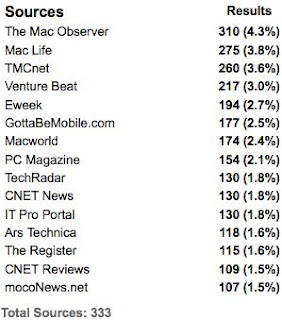 The sources that cover a topic are also sorted by story count. When I went to pitch a recent story about the iPad for a client I realized that there were several publications listed that I didn't track regularly. I recognized the publication's name, but didn't realize they had invested so much editorial on the topic. This key insight drove me to research them better and reach out to an editor that I had neglected with a relevant pitch.
With nearly all of my clients I've found at least one or two reporters that were writing on one of their key topics more frequently than I realized. These are great insights that simply cost too much to discover with traditional media analysis tools.
Turn everything around and search by author right before you outreach to them. Instantly you can see the vendors they mention the most and the topics or themes of the stories. You may think they focus their time on gadgets, but you learn they have a large percent of their stories on storage and cloud computing. That information will help you tune the conversation with that reporter to match their current interests.
The database only goes back six months and this limitation is the only serious flaw I've found. Large brands have a media cycle that is one or two years long so more history would be very helpful. Of course, as the name indicates the search results are limited to information technology publications and reporters. I'd love to see this same tool applied to a wider publication set.
ITDatabase allows you to include or exclude blogs - a useful tool when you need to separate traditional from online media. I haven't used them yet, but the service also includes search tools for editorial calendars and events.
Pricing is $3,000 annually for unlimited number of seats. I'm sure I recovered that cost myself in two weeks of use. They offer a free trial for people that work at a qualified tech vendor or PR firm.
After a few successful weeks of digging for media data on new clients, prospects, competitors and products, nothing beats ITDatabase.


