Sunnyvale, Calif. -- The A-Team, Inger and Travis Murdock, today added Colin Travis Murdock to the cast of their widely anticipated family. The baby was in casting for nine months and inside sources revealed the partnership after catching the trio napping together.
"We knew he was perfect for the part when he gave us a #1 sign during his first casting call in the womb," said director Travis Murdock. "We made him an early offer for the part, but he declined several offers to come out."
Although very late in production, A-Team the family, held a key role for Colin. Although a bit tardy, he is sure to be the focus of nearly every scene. Regardless of the cost, the director indicated that he will make Colin a star. The 8 pound 15.9 ounce actor is enjoying the attention of his fans.
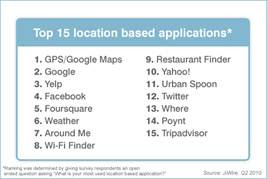
Guide to location-based services, such as Foursquare and Gowalla, for PR and marketing professionals
I checked in on Foursquare as I arrived at a networking event the other day and I was greeted with a free drink if I showed my phone to the bartender. My excitement grew when Foursquare notified me that the restaurant across the street had a two-for-one dinner deal. I grabbed some colleagues to go with me. When we finished, I noticed that the bar across the street offered a free appetizer. So, we trouped across the street determined to follow our Foursquare adventure to its end even if we were already full. When we finished we had consumed drinks, dinner and appetizers all for less than $10 each.
As my experience shows, people are willing to give their location if they know they'll get something for it. JiWire's Insights report found that 53 percent of people are willing to show their location to get more relevant ads. Nielsen reports that 24 percent of Americans have a smartphone and we know that most of the new models have GPS. Foursquare has rapidly grown to 500,000 users and 275,000 check-ins in one day. Mashable reports that the other location-based check-in game, Gowalla, has about 100,000 customers. Additionally, nearly every user-generated review service is adding location to its mobile app because of its benefits to customers and the hope to attract higher advertising rates.
As a PR or marketing professional it is about time to add location-based services to your marketing mix and reputation management programs. Your customers are already mentioning your brand in these services and their comments are showing up in search results. It isn't hard to understand that like other social media, location-based services need active engagement and monitoring. Chuck Reynolds daftly details the impact of these services on local search and search engine visibility in this blog post.
Although not sanctioned by the company, there was even a Foursquare Day last month on April 16 (4/16) that fans put together. I know you have a lot to monitor already in the fragmented social media fracas, so here are some tools that can make it easy to keep an eye on public comments on Foursquare and Gowalla. Both Check-In Mania and FourWhere allow you to search for your business and view the shouts and recommendations people leave.
I love to see the updates and advice from my friends as they check-in throughout their day. It helps me find better restaurants and gets me to try new businesses. As a PR person, I've seen it create real-time buzz around an event and drive longer-term search engine results. It's time to check-in on your brand's reputation before your customers check-out.
Social media really isn't media in the way we typically use the word today in public relations and marketing. Social media are your friends, your colleagues and your customers. Instead of a newspaper where you can place an ad to reach an audience, social media pushes right into their lives. For all practical purposes, it is a direct tie to your friends and customers. Because of its intimacy people have a higher expectation of etiquette and relevancy. Just like you can't cold call a friend (or customer) and try to sell them something, you can't quickly dial-up social media and sell your products.
This requirement of relevancy makes it nearly impossible to approach social media from a short-term campaign perspective. Social media looks a lot more like a long-term partner perspective where each works to deliver something valuable to the other. You have to listen for a long time and then approach the customer when they are ready for your message. PR people familiar with this approach - its called relationship building.
I was impressed with a keynote given by Loic Le Meur at ad:tech San Francisco (slides) where he said that Seesmic responds to every single customer Tweet. Within seconds, hundreds of Tweets from audience members soared from the auditorium challenging Seesmic to respond to them. I'm sure the customer response team hates it when he speaks.
I caught Le Meur immediately following his session and interviewed him in this video.
He urged digital marketers to stop thinking in terms of campaigns and to work to get real fans, not legions of fake followers. You can buy followers with enough marketing, but you want to really read what people are saying about your brand so you can respond and meet their needs.
Le Meur commented that fans are attracted by relevant content, not press releases. This commitment to content is the Achilles heal of any social marketing effort. People that are practiced in producing that type of content are difficult to find in traditional marketing departments. I agree with Paul Dunay's comment "When your content runs out, so does your social media audience."
Using ITDatabase for media relations research on topics, publications and authors
The first thing I ask from my media relations team when I join a company is a list of our top 15 reporters and their publications. My first goal is to build relationships with those important influencers so we can facilitate better communication with them. Basic media relations, right? Well, getting that data is another story. Other than educated guesses, getting those names takes a lot of combing through coverage reports and resorting of spreadsheets. ITDatabase solves this problem in seconds.
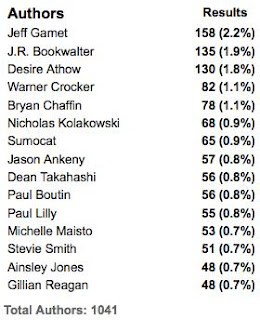
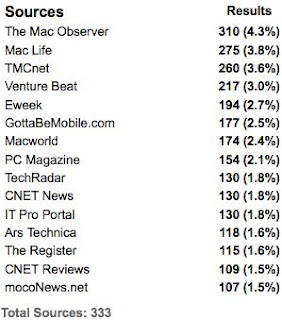
In just a few weeks, this tool has helped me land two news stories and saved me dozens of hours of research. With a couple clicks, the search tool will deliver a list of the authors that have written on any topic in information technology. For example, when you search for Apple iPad, it quickly delivers a list of authors and sources that recently wrote about that topic sorted by the story count. Anyone can search in Google News for stories on a topic, but I need to know how often they talk about that topic.
As the graphic (left) shows, Jeff Garnet, from The Mac Observer, has mentioned the iPad the most with 158 stories. He represents 2 percent of all coverage on the topic. If I was the iPad PR team, I'd probably want to know Jeff fairly well.
IT Database also parses the vendors that are mentioned in the stories that mention iPad. No surprise that Apple is #1, but Google is #2. Google gobbles up share of voice in 20 percent of these stories without having anything to do with the iPad. As a PR professional, this type of data tells me a lot about the conversation and who is really competing with me for the mind of the customer.
The sources that cover a topic are also sorted by story count. When I went to pitch a recent story about the iPad for a client I realized that there were several publications listed that I didn't track regularly. I recognized the publication's name, but didn't realize they had invested so much editorial on the topic. This key insight drove me to research them better and reach out to an editor that I had neglected with a relevant pitch.
With nearly all of my clients I've found at least one or two reporters that were writing on one of their key topics more frequently than I realized. These are great insights that simply cost too much to discover with traditional media analysis tools.
Turn everything around and search by author right before you outreach to them. Instantly you can see the vendors they mention the most and the topics or themes of the stories. You may think they focus their time on gadgets, but you learn they have a large percent of their stories on storage and cloud computing. That information will help you tune the conversation with that reporter to match their current interests.
The database only goes back six months and this limitation is the only serious flaw I've found. Large brands have a media cycle that is one or two years long so more history would be very helpful. Of course, as the name indicates the search results are limited to information technology publications and reporters. I'd love to see this same tool applied to a wider publication set.
ITDatabase allows you to include or exclude blogs - a useful tool when you need to separate traditional from online media. I haven't used them yet, but the service also includes search tools for editorial calendars and events.
Pricing is $3,000 annually for unlimited number of seats. I'm sure I recovered that cost myself in two weeks of use. They offer a free trial for people that work at a qualified tech vendor or PR firm.
After a few successful weeks of digging for media data on new clients, prospects, competitors and products, nothing beats ITDatabase.
Should I go in-house or work for an agency when I graduate college?
You have worked hard in college and want to take the best first step. You know that your first job can put you on a strong upward trajectory. You also probably see that corporate positions seem to offer you a little more money and might not make you jump through as many hoops to get the job. What should you do?
When I attend Public Relations Society of Americaevents, I'm asked this question a few times a month by eager graduates who are exploring internships and first jobs.
Generally, I encourage anxious recent grads to find an agency that has a strong commitment to education and invests in its new employees. That may often be a larger agency that can afford to put together a training program that highlights writing, media relations, social media and digital marketing. Big or small, don't hesitate to ask the agency about their training program. At a basic level you are entering into a trade - you will work hard for them for less money if they agree to give you a top-notch education in public relations.
In my experience, companies offer you less public relations training, but more general marketing and business skills. These are very valuable, but I believe it works best if you get these skills after you have spent a few years of intense PR training. When you work at a company, there will only be a small handful of PR practitioners. Their collective experience is smaller than a PR agency so they can't expose you to all the different areas of communications. In-house PR jobs often focus on a specific PR task that may not be interesting to you and will not help you design your career path.
How do I know this? Well, I started out my career doing just the opposite of my advice. I got a job working for a start-up that luckily had a very progressive PR department with a manager that was wonderfully interested in training me. I got lots of opportunities to learn because she regularly sent our team to luncheons, seminars and conferences. I had a wonderful training ground, but I believe that situation was quite unusual. When I switched to an agency later in my career, I saw that people agency staffers were exposed to a wide set of experiences that a corporate PR department simply can't reproduce. Two or three years at a strong agency is like getting a master's degree in PR and provides you with more options.
To determine if the agencies you are investigating have strong training programs, I'd recommend that you make friends with someone at that agency that is in their first or second year on the job. You can make contact with them at local PRSA event, through LinkedIn or other professional networking mixer. Buy your new friend lunch and pick their brain. Specifically, you want to learn the number of hours a year they are allowed or required to spend in training. In the first few years, you should be spending a minimum of 20 to 40 hours a year in training classes provided by the employer - either on-site or at off-site seminars. A few writing classes here and there simply won't cut it. You need to find a culture of continuous learning that is supported by the agency executives.
You may just want to get in the door without all this fuss, but please be sure you are getting in the right door. It won't do you a lot of good to work hard for two years at a job that isn't giving you that extra polish you need to kick-off your career.
Way before you get to graduation, you should become very involved with your local PRSSA and PRSA chapter. These organizations are often closely aligned with the local agencies and their senior people sit on the board. Volunteer to help on a committee that has lots of interaction with professionals. Once you have developed a relationship of trust, your new colleagues can give you the honest assessment of the agencies in your area. I recommend that you cultivate at least three or four different relationships to get the most accurate information.
There are many paths to success in PR. If an agency job is not right for you, be sure to plan out your path by talking to a lot of professionals. To broaden my experience when I worked on the corporate side, I attended the PRSA National conference each year because it gave me a look at financial relations, analyst relations, digital marketing and client relations. Along with regular attendance at local PRSA events, I felt that I got the extra education I needed to be successful.
Agency or in-house? If you have questions or comments, I'd love to hear them.
People who know me know that I like screens. I have five screens at my desk at work and two in my home office. I learned a long time ago that I was more productive when everything is visible and I don't have to switch back and forth between applications. I often quote this Microsoft research that says you are 9 to 50 percent more effective with multiple screens so my IT department will let me have another display. So, when I was presented with the opportunity to buy an iPad, I thought of it as another way to make me more productive.
After an exciting morning at the Palo Alto Apple store, I fired up the iPad and began "being productive." I was truly amazed at the speed and sharpness of the images. Like the iPhone, I naturally knew how to move the screen, change pages and navigate. The biggest moment occurred Sunday morning when I opened up the New York Times on the iPad. I had the device in front of me as I ate, like the paper, and I was able to click through and quickly find stories, like the Web site. Consuming media was much easier and enjoyable from my couch without my fire-hot MacBook Pro on my legs. Facebook is a lot of fun when you are casually browsing it on the iPad. My iPhone screen is too small to navigate Facebook well (even with the app) and my laptop is awkward. I'm sure I'll consume a lot of media with the iPad and enjoy it more.
My experience with being productive went very differently. As soon as I started to write email messages, everything fell apart. I only have two days using the keyboard, but it is completely impossible to type on at a decent clip. I don't look at the keyboard when I type and I have to rest my fingers on the keys. With a touch-sensitive keyboard you can't do that. Your fingers have to hover above the keys and there are no physical cues to guide you. The keyboard experience is exactly like that of your phone - you can type if you watch the keys and you can only type short messages. The only answer is a physical keyboard. I'm happy to see that Apple has that coming soon.
The device is a brilliant work of art that I believe will set the bar for any company that wants to compete in the tablet space. I've had it for two days and it is already changing the way I consume media. Unfortunately, I'll have to do my content creation on the laptop. The good news is that now I have a sixth screen for my desk.
How to prepare and stand out for your first job interview
It's March and PR students are anxiously looking for internships and first job opportunities. They are facing a tough job market and unsure about how to make the best impression on employers. Much of what they have learned comes from text books that are probably 15 years old. Because these students were born in a digital world they intuitively understand that this is an important skill, but they are looking for practical advice on how to develop and demonstrate these digital communication skills.
I spoke at a Public Relations Student Society of America regional conference on Friday about environmental scanning - a big word for monitoring and digesting the conversation. Interns and new employees are often asked to do daily monitoring and coverage reports. The reason a team may be hiring an intern is likely because they need help with this time-consuming task. A way to quickly shine in the interview is to show that you understand and regularly use these online conversation monitoring tools.
Here are some of the points I shared with students to help them demonstrate their digital skills: 1. Develop a daily media diet - Is this guy telling me to watch TV and surf the Internet? Yes! Unless you understand what the major media outlets are saying, how they work and the way they develop stories, you will never be able to monitor them effectively. Select a major daily, a TV news program and a few outlets that you really like. Read them everyday. Be prepared in your interview to list the news outlets you read each day. I've been reading the Wall Street Journal daily since my Communications 101 teach forced me to subscribe more than a decade ago (a lot more than a decade).
2. Monitor Twitter using TweetDeck - You can't really follow any meaningful conversations on Twitter.com. You need a tool that lets you search on specific topics. Before you interview, learn what clients you may be working on and then monitor everything said about them for a week. In a very short period of time, you will have a good take on the tone of the conversation and may be able to suggest some easy ways the team can engage with the Twitterverse.
3. Use Facebook and other social media sites - Being digitally savvy requires hundreds of hours of practical experience. When you want to learn to ride a bike, you don't get on it for 30 minutes a month. You ride that bike every single day. Even if you are socializing with friends on Facebook, you are learning the social norms and rules of the digital world. I ask every employee I interview if they use Facebook or other social networks to see if they already have these skills. Unfortunately, it is very difficult to teach someone to think digitally so I really need to know if they have those skills already.
Some people advise students to scrub their profiles of all their photos and activities before they start a job hunt. I advise students to be human. Show your personality and be responsible. If you want people to think you are serious then look like a serious person online. I know you do stuff other than PR on the weekends and it is fun get to know you through social media. 4. Develop your voice and build a following - But I'm just a student - No one wants to hear from me! If you are active in PRSSA and you are about to graduate, you probably have a lot of experience that someone in their first two years of school would love to hear. Maybe a long form blog is not right for you right now, but a shorter form blog on Posterous or even Twitter could be interesting. If you really want to be able to show employers that you can advise clients, then you should practice by developing your own content. That can be writing, photos, Tweets or videos.
5. Master a few other services - If you are going to be monitoring the online conversation, take some time to learn these tools too. Your less digital colleagues will be grateful when you join the team and help them save hours a week.
Topsy - Tracks Tweets that include links to stories about your clients. Great for counting the reach of a story on Twitter.
Muckrack - Aggregates journalists that are using Twitter. Great way to find interesting people to follow.
ScoutLabs - Super easy digital monitoring service. Free trial is enough time to learn it and allow you to prepare for you interview.
My6Sense - iPhone app that pulls in all of your RSS feeds, Twitter followers and Facebook friends and then automagically sorts them to put the interesting ones at the top. Great way to consume more media without setting aside more keyboard time.
Bit.ly - Shortens long URLs and lets you see how many times people clicked on those links. Since the data is public, you can even see traffic info on other people's Bit.ly links.
Although I was speaking to a room of smart students, I realized the advice for them is similar I'd give for a more experienced audience. If we get out and use these simple and free tools, we can better engage with our customers and increase the value we offer to our employers and clients.
How PR and marketing can drive more readers to news stories featuring your company
Tom Foremski, former Financial Times reporter and editor of Silicon Valley Watcher, wrote a blog post about a killer public relations pitch for a journalist - a guarantee that the PR person could drive traffic to the story. Foremski said that journalists are being pressured to write stories on topics that will drive page views and that a clicks-for-coverage guarantee might push the reporter to cover a company. Foremski predicts that PR will learn to push traffic in the future, but I'd say that the future is already here. Practiced PR people already have several tools available to them that reliably drive large audiences to stories about their clients.
All of these tools are things you have heard of before, but when they are sharply focused they can drive thousands of unique visitors for a publisher. For some sites, this effort could double or triple their daily views. In addition to the benefits to the publisher, this promotional approach helps a company merchandise its successes quickly and consistently.
Six steps to drive traffic to news stories:
1. Build loyal Twitter following - Appoint at least one person to be your Twitter ambassador to help build a loyal following. Preferably you should develop several executives, product managers, engineers or other industry passionates to engage with the community. When relevant to their followers, they can be a great channel to share your latest New York Times story.
2. Send stories out to sales teams and sales channels - Merchandise the stories so they are easy for sales teams to share with their customers and prospects. This is good news and it deserves its own email with a well-constructed headline so busy sales people take the time to read it. If you are a multi-million dollar company, you likely have thousands of sales people, customers and channel partners that are eager to read the top-tier stories. Their livelihoods are closely tied to your promotional efforts and they want to know what third parties are saying. Throwing it at the bottom of a monthly marketing update email won't help much. Take the time to summarize the story and write it so readers can easily forward it to their network. 3. Build an email list and RSS feed of news stories - Your press section of your Web site probably already lists your top news stories. Add a way for visitors to subscribe to the feed with email and RSS. I worked for a start-up company that built up a list of over 1000 subscribers to its opt-in list. Examination of the list showed that most of our channel, customers, investors and even prospects asked to get this news pushed to them. The list grew on its own without any nurturing from the marketing team. It became one of our best promotional assets and it cost us nearly nothing to build.
4. Socialize your news - Post the news stories to your company's moderated social media sites such as its Facebook Fan page. People are fans because they want to know more about your brand and products. Keep the content fresh and build your community with your hottest hits. 5. Company sponsored media channels - Larger companies have lots of channels, such as newsletters, that reach out to their internal and external publics. Be sure your best news stories are promoted in these outlets. This tactic doesn't drive immediate traffic to the story, but it can add a lot of volume over a longer period.
6. Measure the traffic - The publication's Web site manager may notice a spike in traffic to one story, but it isn't guaranteed the reporter will know that it came from your efforts. Closely track the traffic that you are generating for the story by using a unique Bit.ly link in your promotion of the story. This will allow you to count the number of times that someone with your link clicked on the story. Also, count the number of Tweets that link to the story using tools like Topsy. In your next conversation with the reporter, let them know that you saw the large audience for the story. Also, share this information with your boss - you are driving thousands of additional impressions for your brand and you should get credit.
With this list, I'd also like to add some caution. Please respect the terms of use of social media sites. Don't AstroTurf them with your votes or posts. It's perfectly OK to post your news to your Facebook Fan site, but it would be unethical to drive your employees to Digg a story to drive up its popularity. Your goal is to help people read the news who have an interest in your company, not artificially inflate it. If popularity or ranking is the purpose of the social media Web site (like Digg, and Reddit), think twice before you canvass for votes. Send your followers to the original news story to avoid any appearance of a conflict of interest.
Also, it is important to keep a close eye on the ethical implications of your story promotion efforts. Just like it would be unethical to offer a reporter money for a story, it seems difficult to expressly promise clicks for coverage. I'd never promise a client that I can get coverage in a specific publication. In the same spirit, I'd never want to promise a reporter that I'd drive traffic on a specific story. Generally I'd recommend that PR people build relationships of trust with reporters and the reporters will look to you for assistance in building and promoting their stories.
PR and marketing teams that become media companies and develop their communication channels have the opportunity to greatly increase the readership of news stories. A disciplined approach can increase brand impressions without any additional cost. So, if a killer pitch includes lots of readers, then PR is ready, well, to kill.
Google Sidewiki for PR and marketing professionals
Google Sidewiki has been out for six months and it a is good time understand the strategies PR and marketing should adopt to deal with this new power-to-the-people channel. For those new to Google Sidewiki - it is like Wikipedia, but in this case anyone can comment right on your own corporate Web site. People who come to learn about your company on the well-kept site could see glowing comments from happy customers or spiteful graffiti from upset ex-employees. Instead of arguing if this is evil, legal, or ethical, I'd like to discus how PR and marketing professionals can address this challenge.
When Google Sidewiki was announced, some thought (including me) that this would result in graffiti all over the Web, but it seems that even months later many major brands have no Sidewiki comments. People simply didn't rush out to hate on their easy-to-bash cable company. Like the broader Web, most of the comments that are visible are constructive and seem to make an attempt to be fair. Just because much of the Web is acting civilly doesn't mean that you should leave this channel unmonitored. Like all social tools, each PR department should develop a plan to engage in a meaningful way with people that are attempting to converse with your company.
I pulled this example from Apple.com. When someone navigates to the Web site, Sidewiki prompts the visitor to view the comments. After six months, there are only four entries about Apple. Most of them are positive or neutral, but there is one that really seems to be burrowing into Apple. This opinion can't be removed, but the company has the opportunity to claim the Sidewiki entry and add their own comments (they haven't yet). Company produced comments are often shown at the top and can set the tone for the online conversation. The Web site owner's comments are always shown in green and that difference sets them apart. To help you retain your online reputation and keep the Debbie Downers in check, I recommend that you start with these steps:
Keeping your reputation from getting hijacked by Google Sidewiki:
1. Claim your site - Sidewiki pages should be claimed by the Web site owner. It's a simple process and it allows you to add a post that sets the tone for the other wiki posts. Without any real programming skills, I was able to claim mine in about five minutes.
2. You don't own your corporate Web - the public does - Paraphrasing from a great article on this topic by Jeremiah Owyang, you should shift your thinking on who owns your corporate Web site. The public now owns it, not you. It is best to adjust how you approach all communication now that it is easy for your customers and other stakeholders to add their opinions on your site through social media.
3. Appoint a Sidewiki ambassador - Steve Rubel, Edelman colleague, recommends in this white paper to assign an ambassador to each social network. Sidewiki is one more channel that requires that you establish and embassy and staff it with well-trained ambassadors. They can build relationships and alert you when relations with your community are cooling off.
4. Verify your identity and be transparent - Google is here to stay so it makes sense to invest a little time in your Google profile. A key benefit of the Google account is that it verifies your identity so people know that you are you (mine is here). This free process increases online trust and reduces spamming and scamming. Set a good example for the community and disclose your real name. Account verification instructions are found here.
The corporate Web site as a controlled communication channel has changed with the introduction of Google Sidewiki. Sharp PR and marketing teams still have an opportunity to understand this new user-generated social tool and develop strategies keep your company's reputation from being hijacked.
How has your company addressed comments on Sidewiki? Please post these stories or links to your blogs in the comments section.
Google launched a new social network last week named Buzz that is certain to impact your marketing and public relations programs. At a minimum, the new Google effort adds one more social channel for you to monitor. At the worst, the social network could dramatically impact search engine results for your brand. Before you get stung by Buzz, invest a little time keeping the swarming new community.
Buzz is a mix of Twitter and Facebook. The service accepts updates like Twitter and ties you with all of your friends like Facebook. Most new social networks aren't important when they launch because no one is using them. Google is different because it has a built-in audience of over 100 million accounts and it is clear that much of the technology cool kids raced out to Buzz within hours of its launch. The strong media coverage and Google's brand has it off to a strong start. I saw nearly all of the influencers that I follow on the service in the first two days. To help orient you, Jeremiah Owyang from Altimeter Group put together a good chart that simplifies the differences between Buzz, Twitter, Facebook and Myspace. Also, Ben Parr at Mashable penned a great story that outlines why Buzz is growing quickly.
Because much of the world gets their search results from Google, I pay attention when they add services with the potential to impact search results for brands. Google has been steadily incorporating social updates into their search results. This means that you can pay search engine optimization folks lots of money to drive your brand to the top of a search, but then find that a rash of brand-bashing Tweets pop up in the top of your search results. For example, I searched for Southwest Airlines this evening and was surprised to see the face of Kevin Smith, the director, in the first few results. It appears that he had an incident with the airlines and Tweeted about it. I'm sure that hundreds of hours of SEO work done by the Southwest marketing team were wiped away in seconds by that situation. The public battle between the celebrity and the airline is also occurring on Buzz so it is critical that PR departments actively monitor this new channel for conversations about their brands.
Additionally, Google is certain to start offering paid search results around Buzz content like they do for regular search. This means that your competitors can quickly exploit your public mistakes and buy key words around the conversation about your brand. I haven't seen ads in Buzz yet, but ads are nearly always at the heart of the Google business strategy.
So what can you do about it? I put together some actions that PR and marketing departments can take immediately to help them monitor and engage with the community on Buzz.
How to keep Buzz from stinging your PR program: 1. Get on Buzz and monitor your brands - Go to Buzz and put together a profile. Then connect all of your social networks so your communication in other places automatically flows in to Buzz. Google allows you to verify your account for free so people know that the name in Buzz is really you. It will help you protect your personal brand and helps Google include your posts in their search results. 2. Find and follow your influencers - Just like on Twitter, there are people who are influencing the conversation more than others. Put together your list of traditional and social media influencers and then look for them on Buzz. If you have already followed them on Twitter, you can import them if they are using Buzz with this tool from Tw2buzz. Re-run Tw2buzz every couple of days so you can catch the new influencers that create Buzz accounts. 3. Engage by posting meaningful content on Buzz - Produce meaningful content and then post it to Buzz just like you do on Twitter and Facebook. You'll quickly get feedback and learn how to fit this new channel into your customer engagement program.
4. Make your Web site, videos, photos and content shareable to Buzz - Social networks thrive on people sharing stuff with their friends. Studies show that people are more than three times more likely to share with their friends if you have easy-to-use sharing tools that push that content right into their social network of choice. Social sharing should be the heart of your search engine visibility program because it provides search engines with fresh and popular content when people are searching for your brand.
Right now Buzz seems to be filled with the technology crowd that were enthusiastic contributors on Friendfeed, but the large Google customer base is propelling the just-home-from-the-hospital social network into kindergarten. PR and marketing teams that invest now in the newborn can keep themselves from getting stung by the swarming Buzz community.
Do you have suggestions about how PR and marketing teams can get started on Buzz? Please let us know in the comments section.
How to measure the impact of Twitter on your media relations program
You land a great story in The New York Times and then you see that people are Tweeting a link to that story. You know that the readership of the story is dwarfed by the number of people who are reading it because of the Tweets. Even a couple dozen Tweets by influential Tweeps can reach hundreds of thousands of followers. But, how do you measure that for your marketing department?
There is an accurate and repeatable way to measure the reach of your news stories on Twitter. If you take five minutes to measure them, you can greatly improve the metrics on your media relations program. Additionally, this quick research will uncover the people that are the true influencers in your industry.
Here are a few steps you can follow to measure the reach of your news story:
1. Count Tweets - People who are referring others to your news story will include a link to that story online. Topsy.com has a tool that allows you to plug in any URL and it will show you all the Tweets that include that story. This search engine gives you a quick count of Tweets and lists each message so you can drill into them a bit more. It wonderfully walks each shortened URL so you have all the Tweets in one place.
2. Count of followers - The total potential reach of your story is the count of followers of all the people who Tweeted that story. For the old-school marketers, this is like the circulation of a magazine. You know not everyone who received the magazine read your story, but it is a objective measure of the weight of the publication. Unfortunately, there is no super easy way to get this number right now. Topsy doesn't tally all the followers of the Tweets (Note to Team Topsy - I'd love to see this feature). Yahoo has a unofficial tool called Important People that will count followers for a key word, but won't work on a URL. It allows you to download your search into a spreadsheet so you can easily tally and filter it. For example, I did a vanity search on myself and I pulled up five Tweets that mentioned my name that reached a total of 27,000 people. If these tools don't work, you can count the followers by hand.
3. Click Throughs - Search advertising where you pay when someone clicks on your ad has dramatically changed advertising because marketers can measure the reach of their ads. In a similar way, you can easily measure the number of people who clicked on a Tweet and read your news story. More than one-half of all Tweets use a service named Bit.ly to shorten URLs. In addition to saving you characters in your Tweets, the service gives you a count of the people who have clicked on the link. To figure out how many people have clicked on a Bit.ly link all you need to do is add a + to the end of the URL. For example, add a + to the end of this URL and you can see exactly the number of people that have responded to an event I'm putting on in February.
It is also a great way to see how much traffic your competitors are getting on their news stories. All the information is public so anyone can use it.
If you use this tool, don't forget the Tweets that don't use Bit.ly links. I recommend that you estimate the total clicks based on the ratio of Tweets that use Bit.ly links.
4. The value of a click - When an executive is unsure how effective your media program is at moving sales, be sure you don't skip this step. Nearly everyone agrees that traffic to the Web site is gold for your company. Advertisers can pay $1 to $7 for a keyword for search advertising to get people on your Web site. If you can show your company a large click-through rate, you can multiply that by the market value for your company's name on Google Adwords. If you get 3,000 clicks on your Tweets and the value of the keyword is $1, then you have a story that is worth well over $3000. If you can speak in dollars, everyone will understand you. I wrote a blog post that details this process.
5. Web site referral traffic - Every company has a Web analytics tool that lets the Web master know where traffic to the Web site is coming from. The standard reports from this tool can be a PR person's best friend. Because news stories have a relatively high trust among readers, articles have the power to drive a lot of traffic to your Web site. You know this already, but do you ask for those reports? Even five minutes looking at a Web referral report will likely show you that several of your recent news stories are driving much of the referral traffic. Again, this is another opportunity for you to put a cash value on that traffic. Buy your Web person lunch and get regular access to these reports and add them to your next business review meeting with your boss.
Getting your news stories into the feed of people's updates is a great way to increase the reach of media relations program. It is exciting to see your story be ReTweeted and go viral. Now you have the tools you need to measure these programs.
Do you have tools that you use to measure the impact of Twitter on your media relations and marketing programs? I'd love to hear about them in the comments section.
Wikipedia continues to be one of the most trusted sites on the Web and is regularly listed in the top one or two places on any search. The search engine visibility factor drives every marketing person to peek into what Wikipedia says about their own company or product. That pressure may drive a well-intentioned, but uninformed marketing person to push for inappropriate changes.
Often, PR and marketing people are the ones asked to create or edit a Wiki entry for their client. Creating an entry for a company that you work for is against the Wikipedia conflict of interest policies. Although it is frowned on by the Wikipedia community, everyone has a story about a marketing friend that edited their company's entry and was never caught.
In response to this problem, I drafted this detailed set of guidelines in 2008. Because this piece continues to be my most popular post, I thought it would be good to update the information and re-post it. You may find it overly detailed, but I worked to address every editing temptation that an eager executive could press upon a PR person. I've also linked to nearly all of the sources so it is easy for you to navigate the conflict of interest labyrinth.
Although there are a lot of "No Nos" in this post, at the end there is a clear path for an ethical communicator to address true inaccuracies found in a Wikipedia entry.
If you enjoy the piece and use it, please drop me a line and let me know.
Wikipedia Editing Guidelines for Marketing and Public Relations Professionals
Wikipedia is written collaboratively by volunteers from all around the world. Since its creation in 2001, Wikipedia has grown rapidly into one of the largest reference Web sites, attracting at least 684 million visitors yearly by 2008. There are more than 85,000 active contributors working on more than 14 million articles in more than 273 languages. Entries to Wikipedia often rank high in search engine results and are generally held in high regard by online communities. This trust is fueled in part by Wikipedia’s emphasis on transparency.
Wikipedia Guidelines
Wikipedia includes a list of guidelines that govern its use. When observed, contributors can freely make edits and advance the Wikipedia project. Violations of these guidelines are looked upon negatively by the Wikipedia community and will be removed. Occasionally, an editor or organization that violates these rules is exposed in a public way that diminishes their credibility with customers and other constituents. A simple Internet search of “conflict of interest Wikipedia” returns dozens of stories and blog posts exposing companies that updated a Wikipedia entry. Even factual changes made contrary to the guidelines can damage trust. Content guidelines should be reviewed before an editor makes changes to Wikipedia.
Conflict of Interest
Wikipedia’s conflict of interestpage is the recommended first stop for all marketing and public relations professionals. This short article clearly outlines that Wikipedia aims to produce a neutral, reliably sourced encyclopedia. Directly from the Wikipedia site – “COI editing involves contributing to Wikipedia in order to promote your own interests or those of other individuals, companies, or groups. Where an editor must forgo advancing the aims of Wikipedia in order to advance outside interests, that editor stands in a conflict of interest.”
Although an employee at a company may be the best expert on a topic, technology or product, they have a conflict of interest if their comments benefit that company. According to the guidelines, they should not edit Wikipedia pages “in areas where there is a conflict of interest that would make the edits non-neutral (biased).” Remember that changes are forever recorded in the history section and Wiki editors use tools to trace changes back to individuals to assess their conflict of interest.
Wikiquette
Wikipedia operates on the principal of assumed good faith and its editors follow etiquette guidelines. People come to the site to collaborate and write good articles and in return expect transparency and open disclosure.
·Make all entries verifiable by including references and evidence for each claim or fact
The list of what Wikipedia is not helps contributors understand that the site is not a soapbox, publisher of original thought, advertising outlet, repository of links, directory, democracy or a battleground.
Correcting Information
Wikipedia does have an outlet for circumstances in which information on a Wikipedia page is incorrect and the editor has a conflict of interest. For example, if a page on a specific company incorrectly states the inventor of the company’s key technology, a PR or marketing person can justifiably initiate a correction process. This entails making an appeal to the discussion page located on the top row of tabs of each Wiki entry. This is a place where editors can discuss the contents of the pages and mediate their disagreements. By making an appeal on the discussion page, the contributor is asking a fellow editor without a conflict of interest to make changes. On pages where there is frequent discussion and monitoring, changes can be made quickly by a neutral community member.
Neutral third parties, such as industry analysts and user group members, can be contributors to articles in their subject area. By scanning the list of previous contributors, you may find a neutral party whom you already know. Contact that person through the user talk page to discuss your update.
Experience shows that it can be effective to publish correct information on a company-sponsored page and release it for publication on Wikipedia, giving a neutral third-party editor all the information needed to make a correction. Please see below a letter from Jimmy Wales, Wikipedia co-founder on this topic.
Encouraging experts without a conflict of interest to contribute to Wikipedia speeds the correction process andbuilds reciprocal trust.
Recommendations for appeals to the discussion page:
1.Clearly disclose your affiliation and conflict of interest. Transparency is key to building trust.
2.State your recommended changes and cite verifiable references.
3.Explain your recommendations so others can see their validity. You are working towards a compromise and a balanced presentation.
4.Feel free to discuss the issue on the discussion page. You may even post your recommended changes on this page.
5.Check back on the discussion page to answer questions from the community about your request.
8.If you find you are in dispute with a specific editor, see the dispute resolution page for assistance. There are formal and informal methods of resolving the conflict.
·Letter from Jimmy Wales, co-founder of Wikipedia:
I think we need to be very clear in a lot of different places that PR firms editing Wikipedia is something that we frown upon very very strongly.The appearance of impropriety is so great that we should make it very very strongly clear to these firms that we do not approve of what they would like to do.
It is all well and good to say, well, it is ok so long as they remain neutral, but if they really want to write neutral articles, they can do so, on their own websites, and release the work under the FDL [MIT’s GNU Free Documentation License], and notify Wikipedians who are totally independent.
Additionally, it is always appropriate to interact on the talk pages of articles.If a PR firm is not happy about how something is presented about their client, they can identify themselves openly on the talk page, and present well-reasoned arguments and additional information and links.
Of course it is always going to be the case that unethical practitioners may get involved in inappropriate behavior, but I think this is no argument for simply accepting it.Rather, it is a strong argument for asking people to do this the right way: transparently and allowing independent editors to make the actual editing decisions.
--Jimbo
- Nabble.Com Mailing List
August 21, 2006
This document was drafted by Travis Murdock on August 28, 2008. This document paraphrases and copies text from several Wikipedia articles. These articles have been referenced where possible with their corresponding URLs. Last updated on January 31, 2010.
The value of a click for PR and marketing professionals
All sorts of marketing departments around the world are meeting right now trying to figure out how to get their enthusiastic followers to Tweet about their product. They imagine that each Tweet will drive one more click to reach the chewy customer at the center of the marketing campaign.
I believe there is a hard cash value for each Tweet. Just like any traditional outbound marketing or lead generation program, there is a value to every customer action. Each new customer that comes in the door brings in money. Twitter brings people into your cause or company and they buy your product. I'm not suggesting that marketing departments blast Tweets like they do with direct mail, but instead it makes sense to engage with customers online and listen to the conversation. If you are investing time and money into a social media program, you'll want to know what that investment is getting you.
So, how do we measure the value of a Tweet? I've put together a basic formula that I think calculates that value fairly well. At least it gives you a baseline value to compare against your other customer engagement programs.
Nearly every topic and word has a value in today's online marketplace that is set through Google AdSense. Thousands of people are bidding for these keywords and this auction ensures that the value of the word is set just about right. For example, pretend I work for Specialized, the bike company. If I look up the value of the Specialized Epic on Google Adsense, I know that Google will charge me $.59 each time someone clicks on my ad. Or, the value of that click is at least $.59.
The next step is to count the number of clicks that you've had on your Tweets. If the Tweets in your campaign use a Bit.ly link to shorten the URLs, the service will give you a real-time count of who has clicked on that link. The formula is something like this:
(Dollar value of keyword) X (# of clicks) = Baseline value of the campaign
Imagine that the community posts a cool video of Team Specialized from their last competition. If I saw that I received 11,000 clicks on the link to the video the day it posts, I could estimate that the Day 1 value of the campaign is $6,490.
This formula omits a few important considerations for influence campaigns. Unlike a TV ad where the sender (the TV) is neutral, the sender in social media has a reputation that can greatly enhance the impact of the message. That reputation factor should be multiplied against the baseline value. Tools like Twinfluence attempt to measure influence, but it is still fairly subjective.
Also, the formula leaves out the value to your brand when someone reads a Tweet, but doesn't click. That Tweet improves your brand, but is even more difficult to measure. All marketing campaigns suffer from this problem so it probably equals out when you are comparing the success of campaigns within the same company.
Each click takes marketing and PR professionals closer to the customer. Now that you have a baseline value for those campaigns, you'll be able to quickly demonstrate their value by counting the clicks that it takes to reach the center of the candy coated customer.
I'm a public relations and marketing professional in the San Francisco Bay Area. I currently work for the PR agency Edelman and I'm the past president for PRSA Silicon Valley.