Showing posts with label twitter. Show all posts

Sunday, February 14, 2010

How Google Buzz could sting your PR program

Impact of Google Buzz on PR and Marketing

Google launched a new social network last week named Buzz that is certain to impact your marketing and public relations programs. At a minimum, the new Google effort adds one more social channel for you to monitor. At the worst, the social network could dramatically impact search engine results for your brand. Before you get stung by Buzz, invest a little time keeping the swarming new community.

Buzz is a mix of Twitter and Facebook. The service accepts updates like Twitter and ties you with all of your friends like Facebook. Most new social networks aren't important when they launch because no one is using them. Google is different because it has a built-in audience of over 100 million accounts and it is clear that much of the technology cool kids raced out to Buzz within hours of its launch. The strong media coverage and Google's brand has it off to a strong start. I saw nearly all of the influencers that I follow on the service in the first two days. To help orient you, Jeremiah Owyang from Altimeter Group put together a good chart that simplifies the differences between Buzz, Twitter, Facebook and Myspace. Also, Ben Parr at Mashable penned a great story that outlines why Buzz is growing quickly.

Because much of the world gets their search results from Google, I pay attention when they add services with the potential to impact search results for brands. Google has been steadily incorporating social updates into their search results. This means that you can pay search engine optimization folks lots of money to drive your brand to the top of a search, but then find that a rash of brand-bashing Tweets pop up in the top of your search results. For example, I searched for Southwest Airlines this evening and was surprised to see the face of Kevin Smith, the director, in the first few results. It appears that he had an incident with the airlines and Tweeted about it. I'm sure that hundreds of hours of SEO work done by the Southwest marketing team were wiped away in seconds by that situation. The public battle between the celebrity and the airline is also occurring on Buzz so it is critical that PR departments actively monitor this new channel for conversations about their brands.

Additionally, Google is certain to start offering paid search results around Buzz content like they do for regular search. This means that your competitors can quickly exploit your public mistakes and buy key words around the conversation about your brand. I haven't seen ads in Buzz yet, but ads are nearly always at the heart of the Google business strategy.

So what can you do about it? I put together some actions that PR and marketing departments can take immediately to help them monitor and engage with the community on Buzz.

How to keep Buzz from stinging your PR program:

1. Get on Buzz and monitor your brands
- Go to Buzz and put together a profile. Then connect all of your social networks so your communication in other places automatically flows in to Buzz. Google allows you to verify your account for free so people know that the name in Buzz is really you. It will help you protect your personal brand and helps Google include your posts in their search results.

2. Find and follow your influencers
- Just like on Twitter, there are people who are influencing the conversation more than others. Put together your list of traditional and social media influencers and then look for them on Buzz. If you have already followed them on Twitter, you can import them if they are using Buzz with this tool from Tw2buzz. Re-run Tw2buzz every couple of days so you can catch the new influencers that create Buzz accounts.

3. Engage by posting meaningful content on Buzz -
Produce meaningful content and then post it to Buzz just like you do on Twitter and Facebook. You'll quickly get feedback and learn how to fit this new channel into your customer engagement program.

4. Make your Web site, videos, photos and content shareable to Buzz - Social networks thrive on people sharing stuff with their friends. Studies show that people are more than three times more likely to share with their friends if you have easy-to-use sharing tools that push that content right into their social network of choice. Social sharing should be the heart of your search engine visibility program because it provides search engines with fresh and popular content when people are searching for your brand.

Right now Buzz seems to be filled with the technology crowd that were enthusiastic contributors on Friendfeed, but the large Google customer base is propelling the just-home-from-the-hospital social network into kindergarten. PR and marketing teams that invest now in the newborn can keep themselves from getting stung by the swarming Buzz community.

Do you have suggestions about how PR and marketing teams can get started on Buzz? Please let us know in the comments section.

69NDH525S3BK

Monday, February 08, 2010

Are you Tweeting or Squeaking?

How to measure the impact of Twitter on your media relations program

You land a great story in The New York Times and then you see that people are Tweeting a link to that story. You know that the readership of the story is dwarfed by the number of people who are reading it because of the Tweets. Even a couple dozen Tweets by influential Tweeps can reach hundreds of thousands of followers. But, how do you measure that for your marketing department?

There is an accurate and repeatable way to measure the reach of your news stories on Twitter. If you take five minutes to measure them, you can greatly improve the metrics on your media relations program. Additionally, this quick research will uncover the people that are the true influencers in your industry.

Here are a few steps you can follow to measure the reach of your news story:

1. Count Tweets - People who are referring others to your news story will include a link to that story online. Topsy.com has a tool that allows you to plug in any URL and it will show you all the Tweets that include that story. This search engine gives you a quick count of Tweets and lists each message so you can drill into them a bit more. It wonderfully walks each shortened URL so you have all the Tweets in one place.

2. Count of followers - The total potential reach of your story is the count of followers of all the people who Tweeted that story. For the old-school marketers, this is like the circulation of a magazine. You know not everyone who received the magazine read your story, but it is a objective measure of the weight of the publication. Unfortunately, there is no super easy way to get this number right now. Topsy doesn't tally all the followers of the Tweets (Note to Team Topsy - I'd love to see this feature). Yahoo has a unofficial tool called Important People that will count followers for a key word, but won't work on a URL. It allows you to download your search into a spreadsheet so you can easily tally and filter it. For example, I did a vanity search on myself and I pulled up five Tweets that mentioned my name that reached a total of 27,000 people. If these tools don't work, you can count the followers by hand.

3. Click Throughs - Search advertising where you pay when someone clicks on your ad has dramatically changed advertising because marketers can measure the reach of their ads. In a similar way, you can easily measure the number of people who clicked on a Tweet and read your news story. More than one-half of all Tweets use a service named Bit.ly to shorten URLs. In addition to saving you characters in your Tweets, the service gives you a count of the people who have clicked on the link. To figure out how many people have clicked on a Bit.ly link all you need to do is add a + to the end of the URL. For example, add a + to the end of this URL and you can see exactly the number of people that have responded to an event I'm putting on in February.

Link to event - http://bit.ly/c0Ahzl

Number of people who clicked on this link: http://bit.ly/c0Ahzl+

It is also a great way to see how much traffic your competitors are getting on their news stories. All the information is public so anyone can use it.

If you use this tool, don't forget the Tweets that don't use Bit.ly links. I recommend that you estimate the total clicks based on the ratio of Tweets that use Bit.ly links.

4. The value of a click - When an executive is unsure how effective your media program is at moving sales, be sure you don't skip this step. Nearly everyone agrees that traffic to the Web site is gold for your company. Advertisers can pay $1 to $7 for a keyword for search advertising to get people on your Web site. If you can show your company a large click-through rate, you can multiply that by the market value for your company's name on Google Adwords. If you get 3,000 clicks on your Tweets and the value of the keyword is $1, then you have a story that is worth well over $3000. If you can speak in dollars, everyone will understand you. I wrote a blog post that details this process.

5. Web site referral traffic - Every company has a Web analytics tool that lets the Web master know where traffic to the Web site is coming from. The standard reports from this tool can be a PR person's best friend. Because news stories have a relatively high trust among readers, articles have the power to drive a lot of traffic to your Web site. You know this already, but do you ask for those reports? Even five minutes looking at a Web referral report will likely show you that several of your recent news stories are driving much of the referral traffic. Again, this is another opportunity for you to put a cash value on that traffic. Buy your Web person lunch and get regular access to these reports and add them to your next business review meeting with your boss.

Getting your news stories into the feed of people's updates is a great way to increase the reach of media relations program. It is exciting to see your story be ReTweeted and go viral. Now you have the tools you need to measure these programs.

Do you have tools that you use to measure the impact of Twitter on your media relations and marketing programs? I'd love to hear about them in the comments section.

Sunday, January 24, 2010

How many clicks to get to the center of a Tootsie Pop

The value of a click for PR and marketing professionals

All sorts of marketing departments around the world are meeting right now trying to figure out how to get their enthusiastic followers to Tweet about their product. They imagine that each Tweet will drive one more click to reach the chewy customer at the center of the marketing campaign.

I believe there is a hard cash value for each Tweet. Just like any traditional outbound marketing or lead generation program, there is a value to every customer action. Each new customer that comes in the door brings in money. Twitter brings people into your cause or company and they buy your product. I'm not suggesting that marketing departments blast Tweets like they do with direct mail, but instead it makes sense to engage with customers online and listen to the conversation. If you are investing time and money into a social media program, you'll want to know what that investment is getting you.

So, how do we measure the value of a Tweet? I've put together a basic formula that I think calculates that value fairly well. At least it gives you a baseline value to compare against your other customer engagement programs.

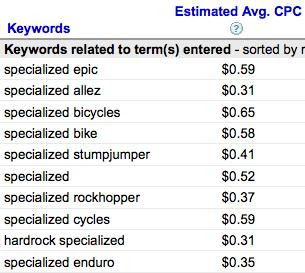
Nearly every topic and word has a value in today's online marketplace that is set through Google AdSense. Thousands of people are bidding for these keywords and this auction ensures that the value of the word is set just about right. For example, pretend I work for Specialized, the bike company. If I look up the value of the Specialized Epic on Google Adsense, I know that Google will charge me $.59 each time someone clicks on my ad. Or, the value of that click is at least $.59.

The next step is to count the number of clicks that you've had on your Tweets. If the Tweets in your campaign use a Bit.ly link to shorten the URLs, the service will give you a real-time count of who has clicked on that link. The formula is something like this:

(Dollar value of keyword) X (# of clicks) = Baseline value of the campaign

Imagine that the community posts a cool video of Team Specialized from their last competition. If I saw that I received 11,000 clicks on the link to the video the day it posts, I could estimate that the Day 1 value of the campaign is $6,490.

This formula omits a few important considerations for influence campaigns. Unlike a TV ad where the sender (the TV) is neutral, the sender in social media has a reputation that can greatly enhance the impact of the message. That reputation factor should be multiplied against the baseline value. Tools like Twinfluence attempt to measure influence, but it is still fairly subjective.

Also, the formula leaves out the value to your brand when someone reads a Tweet, but doesn't click. That Tweet improves your brand, but is even more difficult to measure. All marketing campaigns suffer from this problem so it probably equals out when you are comparing the success of campaigns within the same company.

Each click takes marketing and PR professionals closer to the customer. Now that you have a baseline value for those campaigns, you'll be able to quickly demonstrate their value by counting the clicks that it takes to reach the center of the candy coated customer.


Sunday, August 09, 2009

Pimp my event with Twitter

Engage with top Tweeps to drive attendance at events, conferences and networking mixers.

Public relations and marketing professionals are trying to figure out how to incorporate the promotional power of Twitter into their events. Instinctively, you have a feel that Twitter is a perfect tool to promote the event and engage with your audience, but you may get stuck on where to start. I've used Twitter over the past year for several networking mixers, trade shows and professional development events. Used well, the communication tool will drive more attendees to your events, increase the event's brand equity and increase your media coverage.

Before we dig into how, I'd like to quickly talk about why. Twitter could just be one more hassle in a already complicated event. Let me explain why it is worth it for both the small professional organization all the way up to the 30,000 attendee conference.

First, I assure you that people are already Tweeting about the conference before and during your event. The conversation is already occurring so you should join it.

Second, if you don't claim your position as event organizer, someone else on Twitter will. So, doing a little organizing of the conversation will help you monitor it and increase the quality of the discussion.

Finally, Twitter will drive more registrations to your events and it is a measurement dream. It is easy to tell exactly how many people clicked on your Tweet invitation to register. Take that data to your marketing team and they are sure to fund these efforts in the future.

I've organized these tips into three categories: promotion, engagement and measurement.

How to promote your event using Twitter

1. Set up a hash tag for your event - If you only do one thing, do this one. Set up a hash tag for your event so everyone has an easy way to follow the Tweets about the event and so you can monitor the conversation. It should be short, but very obvious. For example, if you are doing an event for the PRSA Silicon Valley chapter, make the hash tag #prsasv. Put the hash tag on every registration email, promotional email, panel PowerPoint and printed hand-out. You want everyone to use the same one.

2. Invite Tweeps with lots of followers to attend the event for free - People with a large following are sure to drive a lot of people to your event. Once they know they are receiving a free conference or event pass, they are likely to push out the information to their followers and continue the conversation during the event. At one event I organized, we allowed all the high-follower Tweeps into the press room where they had Internet access, food and the exclusivity normally reserved for reporters. These people Tweeted almost constantly during the event to their large following. We recruited these Tweeps through the Web site and verified that they had a large and relevant following. They also happened to know all the parties and made the after-event scene a lot of fun.

3. Email speakers with a suggested Tweet and a discount code - Weeks or months before the event, send an email to your conference speakers with a suggested Tweet. Crafting the suggestion allows them to cut and paste it into Twitter and encourages them to include all the needed details. Because they are speaking at the event, they are likely to enthusiastically share it with their followers. Also, give them a special registration discount code so your speakers feel they have something unique and valuable to offer their followers.

How to engage with event attendees using Twitter


1. Display the Twitter stream at the event - Conferences seem to have screens everywhere. Dedicate a few of them in the hallways to displaying the Twitter stream. This physical reminder of the online conversation will incourage people to Tweet more often and serves as a good information point for those who aren't closely monitoring Twitter. I've also seen it used to bring in those who weren't able to be there in person.

2. Ask for questions through Twitter - By engaging the audience through Twitter, you encourage more people to ask more questions and you help people keep their questions honest. They are among their professional peers and they are unlikely to ask unfair questions. I've also seen panelists and moderators who have been corrected when the material isn't meeting the needs of the audience.

3. Recognize strong Tweets with an @reply - Very quickly the stronger Tweeps will surface in the online conversation. Send a Tweet out that recognizes their work with the conference hash tag to encourage others to follow them. This act will drive the strongest Tweeps to continue their reporting and point the conference followers to these emerging leaders.

4. Tweet the after-parties and activities - When people travel for events, often they are in a town they don't know and are eager to meet their colleagues. Actively organize the after-event parties and activities and Tweet them. This added value to the attendees will drive more people to follow you and also help them to listen to your information during the standard conference hours.

5. Post photos and links to live video - Twitter might be 140 characters, but the platform allows you to make the conference interactive and dynamic by adding links to photos, videos and recordings of the sessions. This content is interesting for those attending the event, but also elevates the stature of the conference for those who couldn't make it this time. I use Twitpic for photos and 12seconds for video.


How to monitor and measure the Twitter conversation

1. Monitor the conversation in real-time - To keep your eye on the conversation, use a tool like TweetDeck or Seesmic that allows you to easily see, sort and reply to Tweets about the event.

2. Use a URL shortening service to count clicks - To count the number of times people click on the links in your Tweets, use a URL shortener that includes stats such as Bit.ly. For example, I recently blogged titled How to influence the influencers. I used a Bit.ly link to direct people to my blog. This data shows that 255+ people clicked on my Tweet and all the people that ReTweeted it. With this data, it is easy to show the Tweets that are working to drive traffic to your registration page and the Tweets that might need a little rewording.

Twitter is appearing at every event and PR and marketing professionals have the opportunity to engage with the community in ways that help build relationships and expand the influence of the conference. If you take just a few minutes to consider these points well before the event, you will grow your event's brand equity and probably increase your revenues.

Have I missed something? Please take a moment to share with me your successes and failures. If you have tools that work better than the one's I've mentioned, I'd love to hear about it.

Resources:
  • For those looking for a nice video tutorial on Twitter, please go here.

Sunday, June 28, 2009

Marketing in the Feed

The new dream of the marketing professional is to reach their customers within feed. The feed is that stream of status updates, shared photos and videos that people see when they log into Facebook, Twitter, Friendfeed or any of the other 50 social networks. That feed is special because people place a higher value or trust in information that comes from their friends. There are several easy tactics that marketing professionals can use to allow fans and supporters to share their cause with their friends.

At a basic level, that feed is generated when a person reads a New York Times article that interests them and they think that others will like it too. They then share that information into a social network using links on the page that quickly email or post that information on another Web site. For example, I love to read the NY Times Most Emailed stories because they are often the best of the paper. Something of unique value is created when you track what people are willing to send to their friends.

Younger generations seem to be getting much or all of their current events through the feed. They learn of Michael Jackson's death or the launch of a new phone through information shared from their friends or a list of people they follow. They may never open the New York Times paper (or go to the Web site), but may read several stories a day when people they follow give their take on the story.

How can marketeers engage with their publics and customers in the feed?

1. Make all content shareable.

Each page, video, photo, press release, whitepaper or piece of content should have a universal sharing menu that allows people to push that information with their friends. There are several free tools that do all the hard work for you. I don't have any reliable stats, but people see roughly 10 percent more page views by simply adding a sharing menu to plain content. Stuff that is hot (like videos) will see much sharper increases in views as fans pass it along.

2. Generate lots of media so your customers can share it.

If you interview a customer, think about how you can turn that single interview into multiple pieces of content. Instead of just interviewing them and taking notes, record it on video, audio and take photos. You can quickly turn that traditional printed customer case study into a one minute video testimonial, audio podcast and photo slide show. This aproach has a multiplying effect on your marketing efforts and will generate a high volume of earned placements from your customers.

For example, I worked for an agriculture technology company that outfitted much of its sales teams with low-cost video camcorders (most used their own home handhelds). Every time they went to a customer's farm, they shot video of the customers using the product. The videos were grainy and shaky, but prospective customers loved them. The amateur video was more credible to them and gave them the "test drive" they needed before buying. Once the amateur clips are uploaded to YouTube, everyone can easily share them and find them on their own. When the videos were embedded into the company's website, those videos received more clicks than anything else on the website and turned into real money for the sales team.

3. Monitor the feed and engage quickly. Hire a community manager.

If you are inviting your customers to share content, you have to listen to them and quickly respond. As the community manager for a software company, I set a goal to successfully close nearly all online conversations within 24 hours. This drove the community engagment team to quickly find and resolve any concerns that arose. Customers and prospective customers always knew that we'd be there to help them and often directed us to conversations that needed our insight. Good community managers are a combination of customer support and public relations people. They must feel free to comment on behalf of the company instantly and know the service well enough to resolve the problem.

4. Identify people with a large following. Engage them early.

Community managers quickly learn who has a large voice or strong following. Since the era of the pitchman, people have sought out those with influence. In feed marketing era, the influence map has shifted dramatically. A single person can have 900,000 followers on Twitter. That influence radius dwarfs the daily readership of all but the largest print journalists.

I recently worked on a campaign with a startup company where a news article about their newly launched service was ReTweeted by a handful of people who had a very large Twitter and Friendfeed following. Within 30 minutes, that story was pushed out to over 600,000 followers. The client saw a sharp spike in Web site traffic from the Tweets that far exceeded the referral traffic it received from the many traditional media stories. In addition to customers, that Tweet appeared in the feed of much of their target stakeholders providing them with critical third-party validation during their launch.

Marketing in the feed is governed by the same brand building strategies. The rules of earning someone's trust and engaging with stakeholders remain constant. The realtime pace and transparency inherent in the feed do require some changes in tactics to help your customers share your good news and respond to their enthusiasm.

Friendly disclosure: I work at a PR agency that represents several social media companies. One of those companies makes tools that allow you to share content online.

Tuesday, June 02, 2009

Internet is a Stream of Conversations

If the Internet is a bunch of tubes, then those tubes are filled with streams of people's conversations. The real Internet isn't a bunch of networked documents, but people who are connected by relationships. Tracking and measuring those conversations is something marketing and PR people do regularly, but it is a challenge. The problem is that I'm not searching for specific information, I'm looking for the connections between people. The strength of the relationship between two people can be measured in the frequency and quality of their conversations. Unfortunately, traditional information search tools want to show you the documents people created not the trust that exists between those posting the information and those reading it.

Topsy released their solution to this marketing and PR problem this week. Although I'm sure they aren't just trying to solve the problems of PR people, I'm seeing that this tool quickly uncovers the social conversation and connections between influencers that I work to find each day.

Topsy listens to the conversations on the social web - the reviews, rants, raves, links and tweets. They compile that information and then present it in a way that makes it easy to see who is saying it and also who else is listening. When I recently tweeted something, I could see through Topsy everyone that had retweeted it and others who were linking to the same topic.

Topsy's first index is of Twitter, but I suspect this powerful tool will begin to index other social media sites where real people are connecting. If you are interested, you can see what Topsy is tracking on me and who else is commenting on those same topics.

The real juice to squeeze out of those Internet tubes is the social conversation and relationships between people on the social web.